DataGrid virtualization explained — row, column, and why it matters
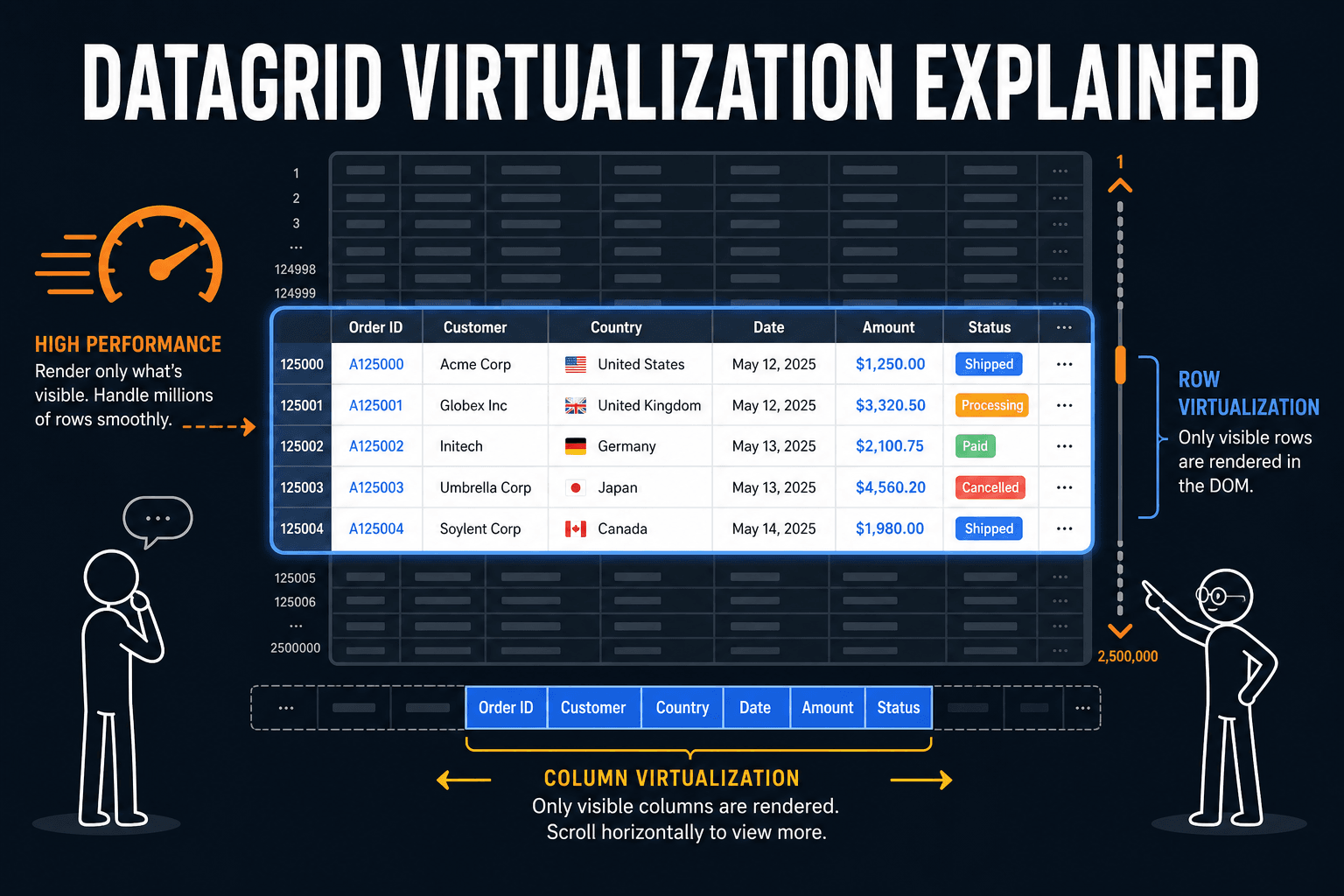
How React DataGrid virtualization works, why row and column virtualization both matter for performance, and how leading grids like AG Grid and Infinite Table handle it.
DataGrid virtualization explained — row, column, and why it matters#
When your DataGrid has to show tens or hundreds of thousands of rows, rendering every cell would bring the browser to a halt. Virtualization is the technique grids use to only render what’s visible (plus a small buffer), so scrolling stays smooth. In this article we’ll cover how it works, why both row and column virtualization matter, and how different grids approach it.
TL;DR
Virtualization means rendering only the visible viewport (and a small buffer). Row virtualization is common; column virtualization is rarer but important for wide grids. Leading grids like AG Grid and Infinite Table virtualize both axes. Headless libraries like TanStack Table leave virtualization to you.
Why virtualization matters#
Without virtualization, a grid with 100,000 rows and 50 columns would try to create 5 million DOM nodes. That’s slow to mount, slow to update, and painful to scroll. With virtualization, the grid:
- Calculates the visible viewport — which row range and column range are on screen.
- Renders only those cells (plus a small overscan for smooth scrolling).
- Reuses DOM — as you scroll, rows/columns are recycled instead of destroyed and recreated.
The result: you get a smooth experience even with very large datasets. The exact numbers depend on row height, column width, and how efficiently the grid reconciles updates.
Row virtualization vs column virtualization#
Most “virtualized” grids do row virtualization only: they only render the visible rows. That’s enough when you have many rows and a modest number of columns (e.g. 20–30).
When you have many columns (50, 100, 200+), only virtualizing rows isn’t enough. Off-screen columns still create DOM nodes and take memory and CPU. Column virtualization means only the visible columns (and a buffer) are rendered. Combined with row virtualization, the grid only ever has a small, fixed number of cells in the DOM, regardless of data size or column count.
In practice, for large tables (many rows or many columns), you want a grid that virtualizes both axes. AG Grid and Infinite Table both do this out of the box, which is why they’re often chosen for high-density, enterprise-style UIs.
What actually makes scrolling feel fast#
Beyond “do you virtualize rows and columns?”, a few things matter:
- Overscan size — A small buffer of off-screen rows/columns reduces pop-in when scrolling quickly. Too large and you waste memory; too small and you see blank areas if the grid is not quick to render.
- Cell update granularity — When data or selection changes, does the grid re-render the whole table or only the affected cells? Finer granularity keeps interactions snappy.
- Sticky / pinned columns — Pinned columns add layout and rendering complexity. How the grid handles them (without thrashing or full re-renders) affects perceived performance.
If you’re comparing grids for a heavy workload, try a stress test: 100k+ rows, 50+ columns, scroll both axes, then change a few cell values or selection. The grids that stay smooth are the ones that virtualize well and update efficiently.
For a higher-level take on picking a grid, see Which is the best datagrid? and our 2025 comparison of AG Grid, Infinite Table, MUI X DataGrid and TanStack Table.
How different grids handle virtualization#
| Grid | Row virtualization | Column virtualization | Notes |
|---|---|---|---|
| AG Grid | Yes | Yes | Mature, widely used; server-side row model scales to very large datasets. |
| Infinite Table | Yes | Yes | Built for large datasets; focuses on smooth UX and efficient updates. |
| MUI X DataGrid | Yes | Yes | Virtualization included; good fit for Material-based apps. |
| TanStack Table | Headless | Headless | You bring your own virtualization (e.g. TanStack Virtual); maximum flexibility. |
With headless solutions like TanStack Table, you choose the virtualization layer (e.g. TanStack Virtual) and wire it to the table. You get full control; you also own the integration and tuning.
Standout strengths#
- AG Grid — PRO: it can render huge amounts of data. The client-side row model comfortably handles hundreds of thousands of rows, and the server-side row model takes it beyond what fits in the browser — the virtualization layer has been battle-tested at scales few other grids see in production.
- Infinite Table — PRO: it can keep the overscan size at 0 while staying flicker-free. Remember the overscan trade-off from earlier: most grids (AG Grid included) need a buffer of off-screen rows to avoid blank flashes during fast scrolling. Infinite Table renders quickly enough to not need that buffer at all, so it renders strictly the visible cells — fewer DOM nodes, less memory, no flicker.
When to care about virtualization#
- Small tables (< 100 rows, < 20 columns) — Virtualization may add complexity without much benefit. Many grids still work fine without it for this size.
- Medium tables (hundreds to low thousands of rows) — Row virtualization is usually enough; column virtualization starts to matter if you have 40+ columns.
- Large tables (10k+ rows or 50+ columns) — You want a grid that virtualizes both axes and has been tested at that scale. This is where AG Grid and Infinite Table shine.
Summary#
Virtualization is what lets DataGrids handle large data without freezing the UI. Row virtualization is the baseline; column virtualization matters for wide grids. The best fit for your app depends on how many rows and columns you have and how much you want to customize. If you’d like help sizing or stress-testing a grid for your use case, we’re happy to help.
For more content like this, follow us on at @thedatagrid